A personal place on the web

Master
of none.

… often better than a master of one.

By hand and on screen.

Keith Gagne
Certified human.

I like simple, tactile things.
For me, understanding often begins with visualization.

I’m Keith. I write code, even though its invisible workings can frustrate me. Away from the screen, I renovated my first house, then built a home.

Explore the work

The desktop I use every day, made for anyone to install.

Linux desktop / Open source

limDE — less is more.

A small labwc desktop for Ubuntu Server, made for laptops first.
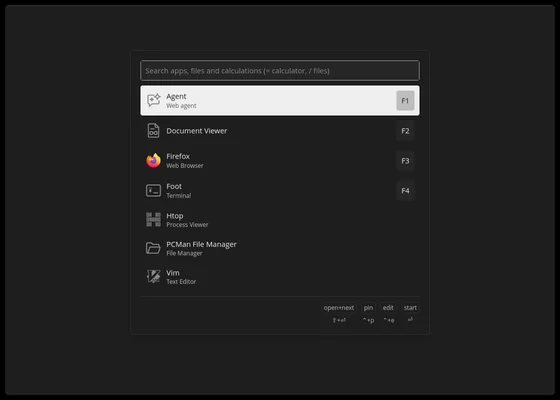
The limDE desktop with the Walker launcher open: a search box for apps, files and calculations above a list of Agent, Document Viewer, Firefox, Foot, Htop, PCMan File Manager and Vim.
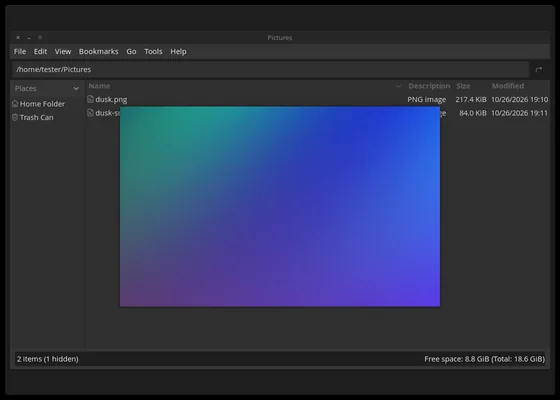
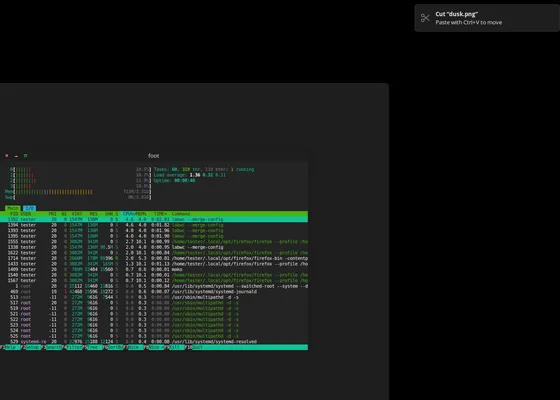
PCManFM showing a Pictures folder, with a Space-bar preview of a blue and purple gradient image floating over the file list. The foot terminal running htop, with a notification in the corner reading Cut “dusk.png”, paste with Ctrl+V to move.
Super+Space opens the launcher. Space previews a file. Cutting one says so. Cropped from a clean install in a virtual machine.

It started as a trial run at leaving Windows, which became the minimal setup I use every day on my own laptop. limDE is that setup, made installable for anyone. It isn’t a distribution: install Ubuntu Server 26.04, clone the repository, run ./install, and log in.

I relied heavily on AI to build it. Claude Code, Anthropic’s coding agent, wrote most of the code, install scripts, and documentation, and ran the install tests in virtual machines. I decided what limDE should be and do, used it on my own laptop, reported what was wrong, and reviewed and committed the changes.

Two smaller pieces are proposed upstream and still open: a Space-bar preview for the PCManFM file manager (pull request #64) and an opt-in dots indicator for the swaylock lock screen (#475). I introduced limDE on labwc’s Show and tell.

Two goals shaped it from the start.

  1. Keep battery drain low, and visible. It starts only what the desktop needs. The panel shows the battery’s live draw in watts and the hours left, and colours the icon as the draw climbs, so a jump stands out. Click it for a graph of the draw over 3 hours, 24 hours, or 7 days.
  2. Scrolling that follows your fingers. Trackpad motion and scrolling modelled on a MacBook’s. It uses the custom acceleration I added to labwc, merged into labwc’s upstream master (PR #3715) but not yet in a release, so limDE builds labwc from a pinned upstream commit. My tuned curves from the touchpad exploration are on by default.
≈240 MiB
of memory for the desktop itself on my laptop. With the agent window open, the whole system uses about 3.0 GiB of 16 GB, most of it the agent window’s Firefox.
31 of 31
checks passed in a clean-VM install test of the first beta, including a second run and a reboot.
Beta
v1.0.0-beta.2. The first public release, beta.1, was in October 2026. MIT licence.

Still open: it’s in daily use on my Dell XPS 15 9520, but it hasn’t been verified on any other hardware. Fresh installs have been tested only in QEMU and from a USB stick on that same laptop, and the trackpad curves were tuned on its touchpad, so they may feel different on yours. Ubuntu 26.04 on x86_64 only, Wi-Fi networks are joined with nmtui for now, and there’s no uninstaller yet.
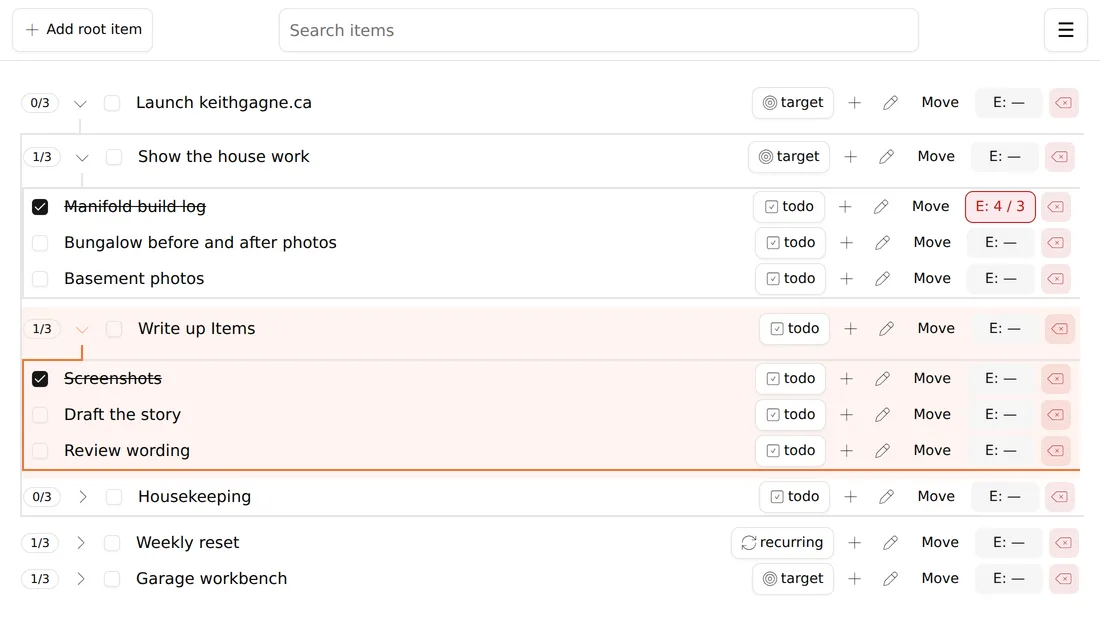
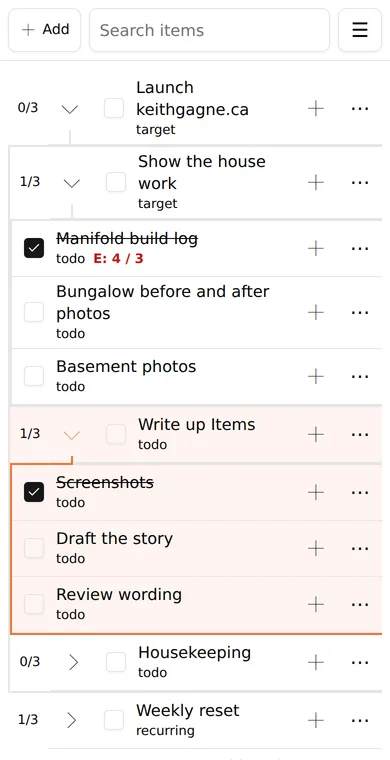
I write code to make the invisible parts visible.

I like being able to see how something works. It’s part of why I find mechanical watches fascinating. Code doesn’t give me that physical connection, so I go looking for it: a task tree whose progress I can watch roll up, menus that land where they should, and a scroll I can feel under my fingers.

Browser geometry

Where does
the menu belong?

The button is inside an embedded frame. The menu appears in the page around it. Their coordinates start in different places.

Crossframe Positioning walks through the containing frames, adds their offsets, then finds room for the menu. It separates “where is the button?” from “where will the menu fit?”

Make the invisible part visible

The idea, in numbers

40frame offset20button inside frame60button in the page

Illustrative coordinates. Everything needs the same starting point.

Still open: the project’s tests cover placement and edge handling. Browser tests for walking through nested frames remain a next step. The frames must share the same origin.

Crossframe Positioning View on GitHub
Touchpad feel / Exploring with AI

Could AI help solve a problem I could feel?

I wanted more precise low-speed two-finger scrolling on my Dell XPS 15 9520, while keeping faster movement responsive. That real, everyday problem became a way to explore what I could accomplish with AI.

I relied heavily on AI throughout this work. I knew the problem and how the result should feel. AI helped me work through unfamiliar compositor and input code to get there.

Inside the exploration with AI

The experiment began with something I could feel and wanted to improve. Relying on AI to work through the unfamiliar software made me reconsider what was within reach.

With substantial help from AI, the experiment began by shaping scroll events inside labwc, the software that manages the desktop’s windows. It later moved to a custom acceleration profile in libinput, the layer that handles input devices.

The resulting configuration gives scrolling its own response curve, while pointer motion and fallback behaviour stay one-to-one. The documentation produced during this AI-assisted work also clarifies that the curve’s values describe output speeds, not multipliers: an input of 0.20 and an output of 0.040 give an effective gain of 0.20.

This exploration with AI lives in my labwc fork. Update: it moved out. My three commits, the scroll curve, the opt-in custom acceleration profiles, and their documentation, were merged into labwc’s upstream master in September 2026 (PR #3715). They’re not yet in a release. My curve values stayed home: they’re device- and user-specific, not a universal preset.

Follow the experiment’s change of approach
The scroll curve from this exploration with AI View the documented experiment

A 1960s bungalow.

My first house was a three-bedroom bungalow with a layout that already worked well. We gutted the kitchen and bathroom, then opened up the kitchen, living, and dining areas by removing walls and installing an engineered beam. The kitchen got a completely new layout, the bathroom a full revamp. It became a renovation of the entire main floor.

Later, I stripped the basement back to the concrete walls and installed a three-piece bathroom. Framing, insulation, drywall, flooring, and trim followed. I did it all. Each job left me with something I could carry into the next.

The next logical step.

After renovating and selling that house, building a home from the ground up felt like the next logical evolution. What I’d learned had changed what I thought was possible.

On the new home, I did all the labour apart from HVAC, framing, the foundation, and the drain, waste, and vent plumbing. I’d done the work before on a smaller scale. The challenge was the sheer amount of it, while also working full time.

10 months to an occupancy permit.
2 more months to finish everything.

A manifold I could have bought.

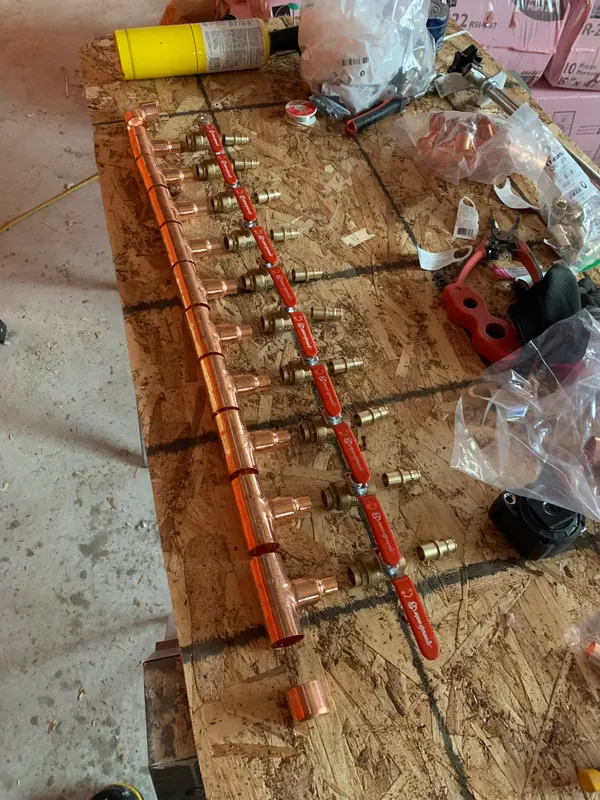
I ran every water line in the new home, from the meter to each fixture. Where those lines begin, I built the manifolds myself.

The prebuilt ones fell short. Some had enough ports but used plastic parts. Others had the wrong pipe sizes. Building my own meant copper throughout, a better choice of ball valves, and a finished manifold that looked the way I wanted. It was a challenge, and one of the more rewarding things I’ve built.

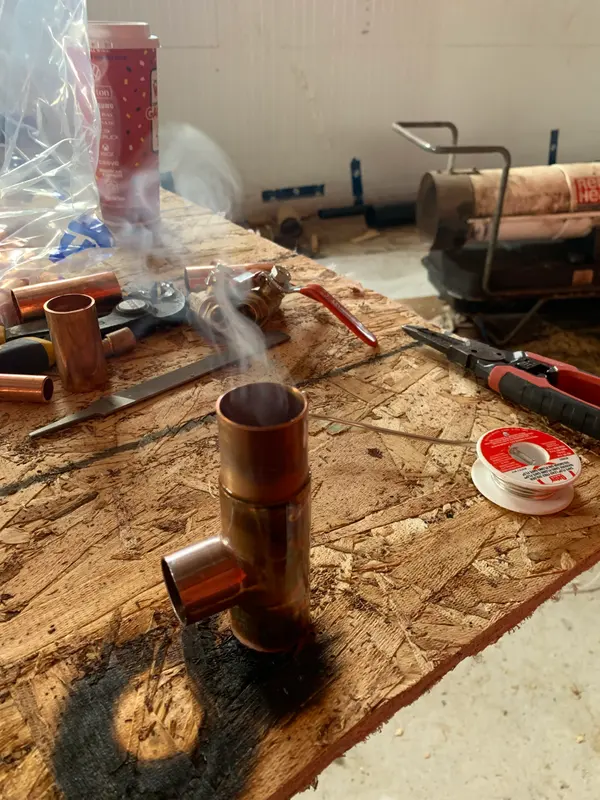
  1. A freshly soldered copper tee standing on a plywood workbench, smoke still rising from it, with a spool of solder beside it.
    One joint at a time.
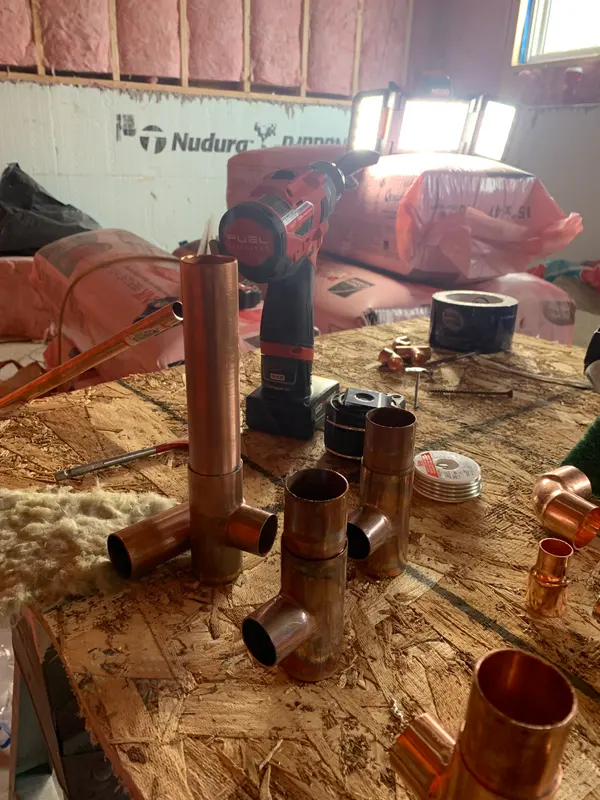
  2. Several copper tees with short pipe sections soldered in, standing upright on the bench in front of an insulated basement wall.
    Parts before the whole.
  3. A long copper header with a row of outlets, red-handled ball valves and brass fittings laid out beside it on the workbench.
    A valve for every line.
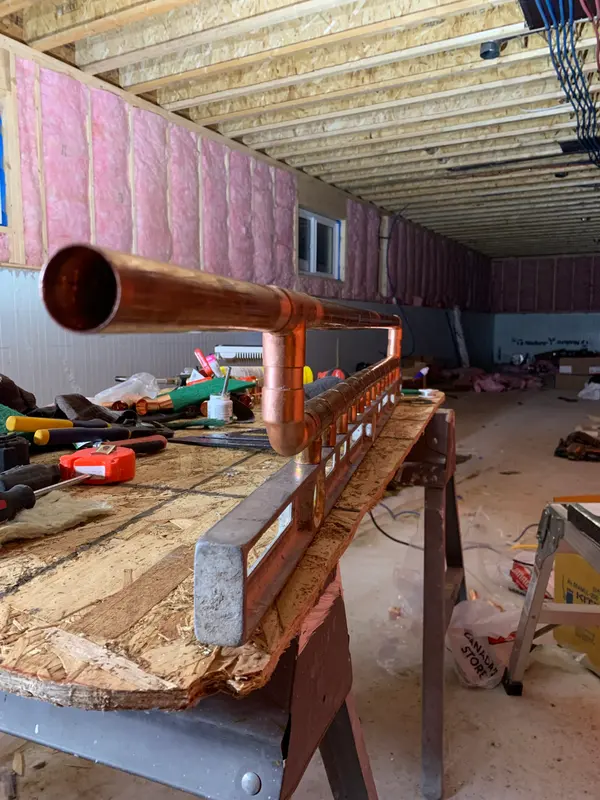
  4. Looking down the open end of the assembled copper manifold as it rests against a long level on the bench, with the unfinished basement stretching behind.
    Kept honest by a level.
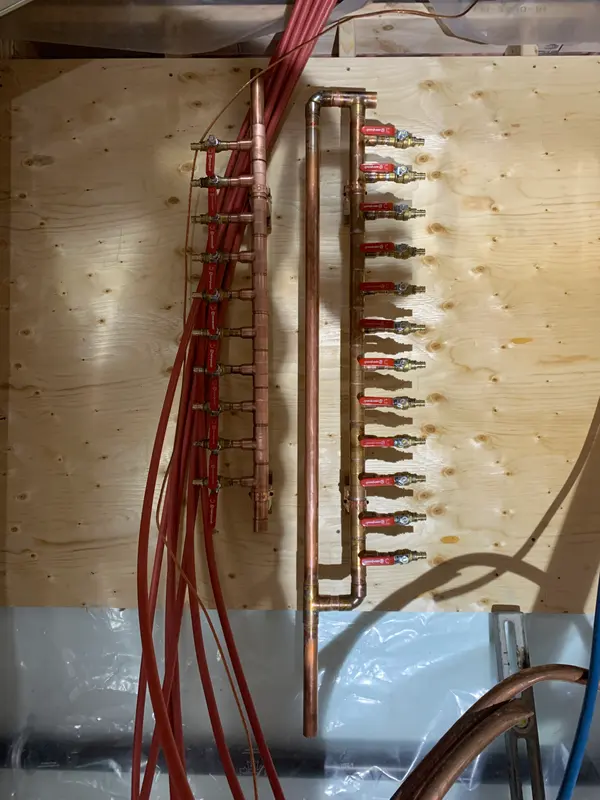
  5. Two finished copper manifolds with red-handled valves mounted on a plywood panel, red supply lines hanging loose beside them.
    On the wall, waiting for water.
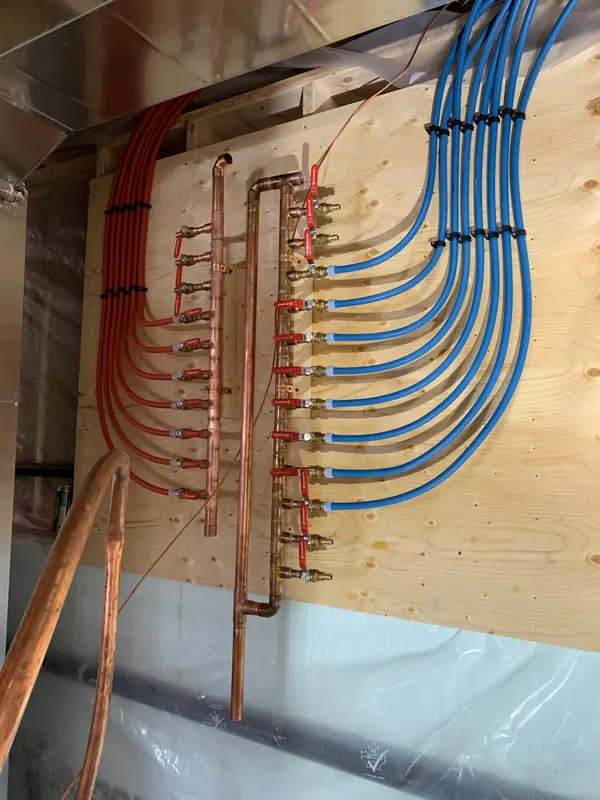
  6. The mounted manifolds fully connected, red lines curving neatly in from the left and blue lines from the right, clipped in parallel runs.
    Red for hot, blue for cold.

How I figure things out.

Physical, tactile work clicks for me. I can usually work things out with relatively little trial and error. When I don’t know something, I read, research, and watch YouTube videos. Before trying it, I weigh the risks and what a mistake would mean. Confidence grows from that understanding.